

Getting started with Murano
Murano is a library for mechanistic interpretability: reading and editing what a language model computes internally. It offers a quick API for exploring and a pipeline API for experiments you intend to keep, and this notebook covers both.
Key questions
- Where does a concept like sentiment live inside a model?
- Can we change the model’s behavior by editing one direction?
- How do we make such an experiment reproducible instead of a pile of scripts?
Structure
- Set up a model
- Explore with the quick API
- Rebuild it as a pipeline
- Measure the model
- Save and plot
- Write your own step
Model and data. GPT-2 small in float32. It is small enough that bfloat16 rounding visibly degrades its predictions, so the notebooks load it explicitly in float32. Contrastive sentences come from murano.tasks.
Requirements. pip install murano-interp[plot]
1. Set up a model
Section titled “1. Set up a model”import torch
from murano import MuranoModel, Pipeline, keys
OUTPUT_DIR = "murano_outputs/getting_started"
# GPT-2 is small enough that bfloat16 rounding degrades its predictions.model = MuranoModel("gpt2", dtype=torch.float32)print(f"{model.model_id}: {model.n_layers} layers, {model.n_heads} heads")gpt2: 12 layers, 12 heads2. Explore with the quick API
Section titled “2. Explore with the quick API”MuranoModel is also exported as murano.Model. Its methods build a one-step
pipeline internally, which is what you want while exploring.
record runs the model and returns the residual stream at the layers you asked
for, keyed by component address: (10, "residual") is layer 10’s block output.
activations = model.record("The Eiffel Tower is located in", layers=[5, 10])
print("layers recorded:", list(activations.positive.keys()))print("layer 10 shape :", tuple(activations.positive[(10, "residual")].shape))
layers recorded: [Node(layer=5, module='resid_post', head=None, position=None, side=None), Node(layer=10, module='resid_post', head=None, position=None, side=None)]layer 10 shape : (1, 768)find_direction takes contrastive pairs and returns the mean difference between
them at every layer, plus how well each layer separates the two sets.
from murano.tasks import sentiment
positive, negative = sentiment(n_per_class=8)direction = model.find_direction(    positive=positive, negative=negative, layers=[4, 5, 6, 7, 8])
print("best separating layer:", direction.best_layer)for layer, score in sorted(direction.separation_scores.items()):    print(f"  {layer}: {score:.3f}")
best separating layer: L4.resid_post L4.resid_post: 1.815 L5.resid_post: 1.813 L6.resid_post: 1.455 L7.resid_post: 1.467 L8.resid_post: 1.538ablate projects the direction out of the residual stream, so whatever the
direction encodes stops being available to the model.
prompt = "The movie was"gen = {"max_new_tokens": 12, "do_sample": False}
print("clean  :", model.generate(prompt, gen_kwargs=gen))print("ablated:", model.generate(prompt, ablate=direction, gen_kwargs=gen))
clean : released in Japan on May 7, 2016.
Theablated: a huge success, and I'm very happy with the way3. Rebuild it as a pipeline
Section titled “3. Rebuild it as a pipeline”The quick API is fine until you want to keep the intermediate artifacts, compose several analyses, or hand the experiment to someone else.
The whole contract is one line:
step(results) -> resultsEvery step declares which keys it reads and which it writes. Pipeline runs
them in order over a shared Results object, so each step sees everything the
earlier ones produced.
from murano.dataset import MuranoDatasetfrom murano.steps import Intervene, Load, LoadPrompts, Record, SteeringVector
dataset = MuranoDataset.contrastive(positive=positive, negative=negative)
pipeline = Pipeline(    [        Load(dataset),        Record(model, layers="all", position="last", batch_size=8),        SteeringVector(normalize=True),    ])
validate() is a dry run. It walks the chain and checks that every key a step
reads was written by an earlier one, so a typo fails in milliseconds rather than
after a long forward pass.
print("keys the pipeline will produce:", pipeline.validate())keys the pipeline will produce: ['dataset', 'prompts', 'record', 'steering']results = pipeline.run()
print("best layer:", results[keys.STEERING].best_layer)print("results now holds:", results)best layer: L4.resid_postresults now holds: Results(['dataset', 'prompts', 'record', 'steering'])Intervene can read the direction straight out of Results via direction_key,
so deriving and applying compose into a single pipeline.
direction_layers chooses where to apply it, alpha how hard to push. Neither
has a setting that is right everywhere: applying every layer at once can
over-steer a deep model into degenerate text, while the best-separating layer
is not always a good place to intervene. steering.ipynb walks through both
failure modes.
LoadPrompts replaces the prompts without touching the steering key.
steered = Pipeline(    [        Load(dataset),        Record(model, layers="all", position="last", batch_size=8),        SteeringVector(normalize=True),        LoadPrompts(["The movie was", "My friend is"]),        Intervene(            model,            direction_key=keys.STEERING,            mode="steer",            alpha=8.0,            direction_layers="all",            gen_kwargs={"max_new_tokens": 10, "do_sample": False},        ),    ]).run()
comparison = steered[keys.INTERVENE]for i, prompt in enumerate(comparison.prompts):    print(f"{prompt!r}")    print(f"   clean  : {comparison.clean_generations[i]!r}")    print(f"   steered: {comparison.modified_generations[i]!r}")
'The movie was' clean : ' released in Japan on May 7, 2016.\n' steered: ' a great experience.\n\nI love the food''My friend is' clean : " a very good person, and I'm very happy" steered: ' a big fan of the new and I am very'4. Measure the model
Section titled “4. Measure the model”Logits runs one forward pass and writes the raw logits plus next-token targets.
The metric steps read those and write a MetricScore.
from murano.steps import AccuracyStep, CrossEntropyLossStep, Logits
measured = Pipeline(    [        LoadPrompts(["The capital of France is Paris", "The sky is blue"]),        Logits(model),        CrossEntropyLossStep(),        AccuracyStep(),    ]).run()
print(f"cross-entropy loss : {float(measured[keys.LOSS]):.3f}")print(f"next-token accuracy: {float(measured[keys.ACCURACY]):.3f}")
cross-entropy loss : 8.848next-token accuracy: 0.1255. Save and plot
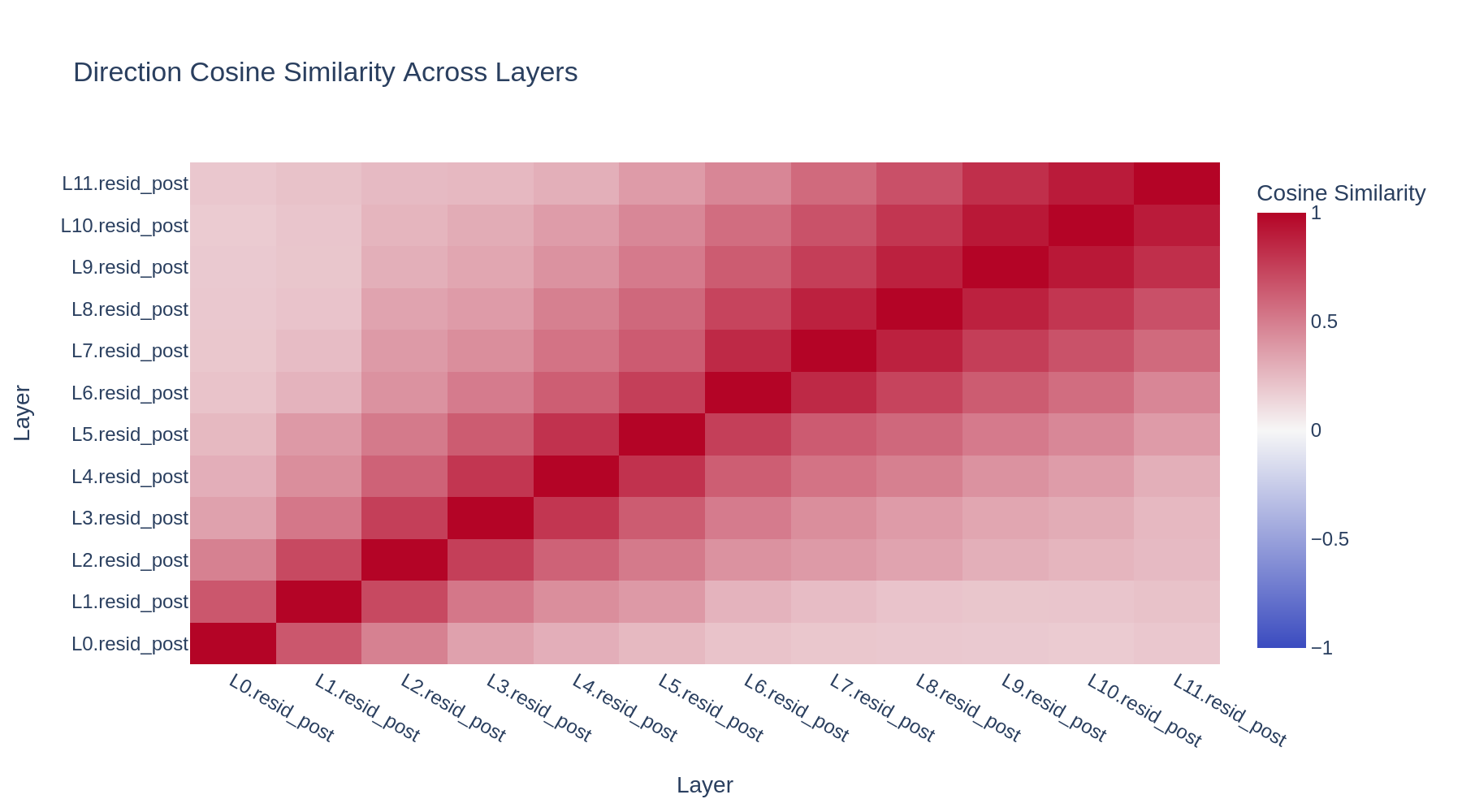
Section titled “5. Save and plot”Save writes every artifact it recognizes into output_dir/run_name/ and records
that path in results["output_dir"]. Plot then picks it up, so artifacts and
figures land in one tree. Plot renders whichever results are present, saving a
PNG and displaying the interactive figure inline.
from murano.steps import Plot, Save
saved = Pipeline(    [        Load(dataset),        Record(model, layers="all", position="last", batch_size=8),        SteeringVector(normalize=True),        Save(            output_dir="murano_outputs",            run_name="getting_started",            model_id=model.model_id,        ),        Plot(),  # no output_dir: inherits the one Save just wrote    ]).run()
print("artifacts and plots under:", saved[keys.OUTPUT_DIR])
artifacts and plots under: murano_outputs/getting_started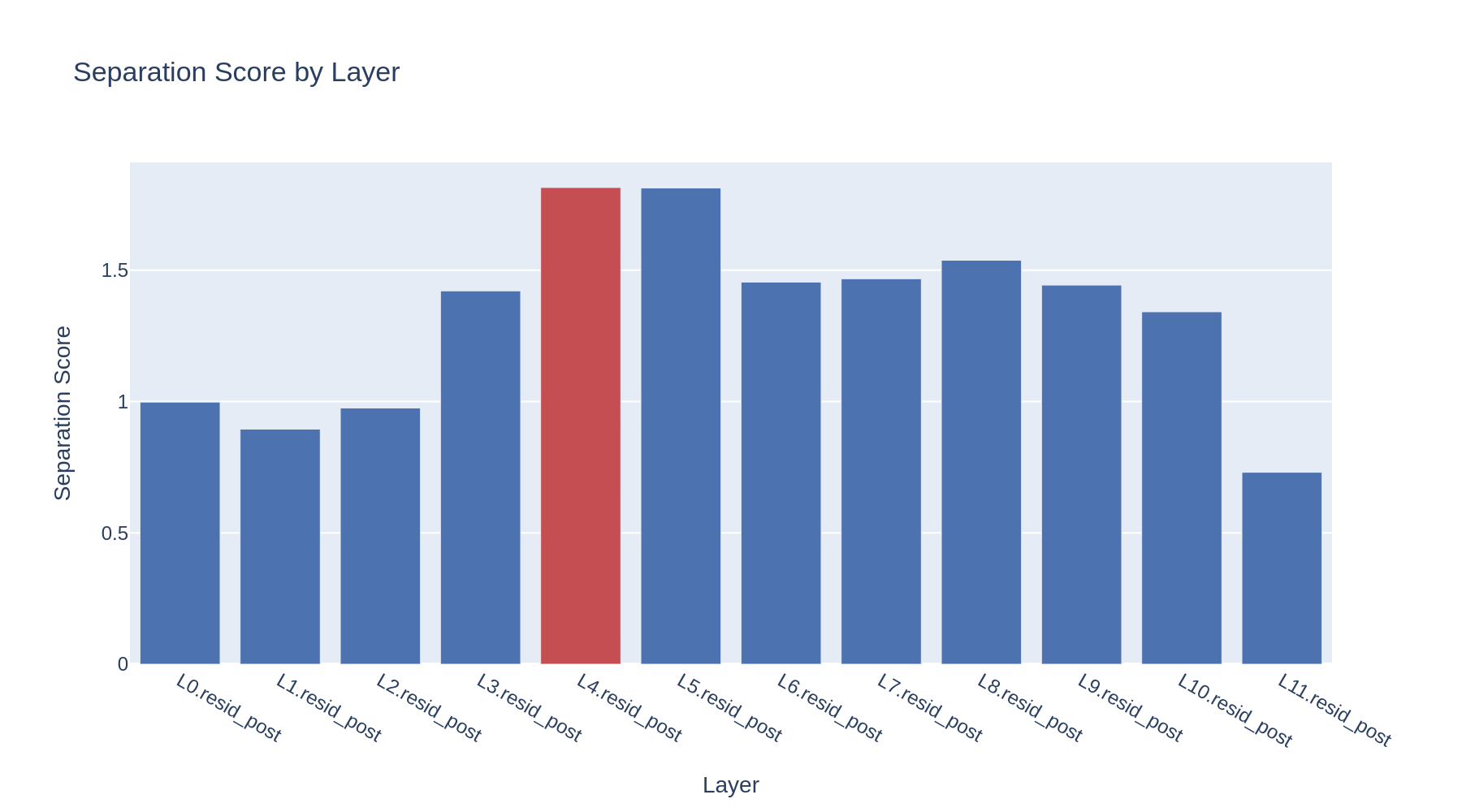
6. Write your own step
Section titled “6. Write your own step”A step is a class with reads, writes, and a __call__. That is the whole
interface. Once it follows it, the step composes with every built-in step and is
validated for free.
from murano.results import Resultsfrom murano.steps.base import Step

class MeanGenerationLength(Step):    """Average word count of the clean and modified generations."""
    reads = [keys.INTERVENE]    writes = ["mean_length"]
    def __call__(self, results: Results) -> Results:        comparison = results[keys.INTERVENE]
        def mean_words(texts):            return sum(len(text.split()) for text in texts) / len(texts)
        results["mean_length"] = {            "clean": mean_words(comparison.clean_generations),            "steered": mean_words(comparison.modified_generations),        }        return results

print(MeanGenerationLength()(steered)["mean_length"])
{'clean': 7.5, 'steered': 8.5}What next
Section titled “What next”applications/steering.ipynbtakes section 3 further, with a real dataset and an evaluation metric.applications/probing.ipynbasks where a concept is linearly readable.applications/custom_pipeline.ipynbcombines several steps into an experiment no single step performs.